 Western Wilson
Linting and formatting code
TL;DR: Code style and formatting should not steal your brainpower. Set up linting/formatting at three touchpoints (your editor, your pre-commit hook, and your CI pipeline) and formatting becomes automatic from the moment you write code to the moment it merges. At the end, this reflection walks through exactly how to do that for a Python FastAPI project.
Linting and formatting code
Recently, while working on a personal DevOps project, I spent some time looking into linting tools. They amazingly save your brainpower for the actual problem, instead of code styling. Whether it’s two spaces or four per indent, single quotes or double, I don’t mind. Other people have thought deeply about these trade-offs, landed on reasonable answers, and codified them. I’m happy to piggyback on that.
I aim to write code that works, and let the styling happen automatically.
There’s a side benefit too: when a codebase consistently uses a popular linting tool, anyone familiar with it can scan the code and immediately know where to look. It’s like how headings in a research paper let you scan before you commit to reading.
Three touchpoints that matter
Good linting hygiene should show up at meaningful points in your development lifecycle:
- In your IDE (or text editor), as you write
- Locally, before you commit
- In CI/CD, before code merges
Each layer serves a different purpose. Together, they make code quality essentially automatic. (Tools like SonarQube go deeper —security, coverage, and code smells at a project level— but that’s a reflection for another time.)
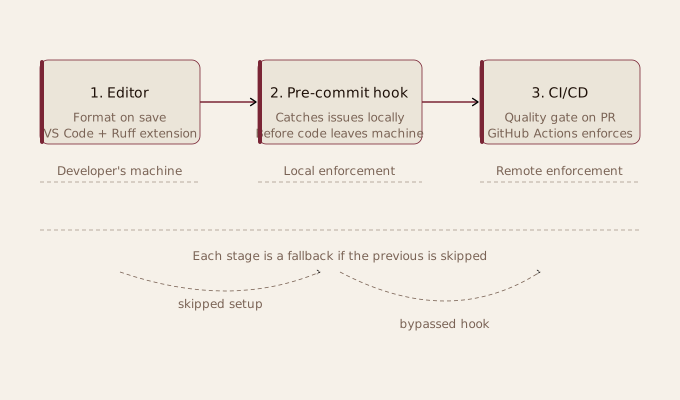
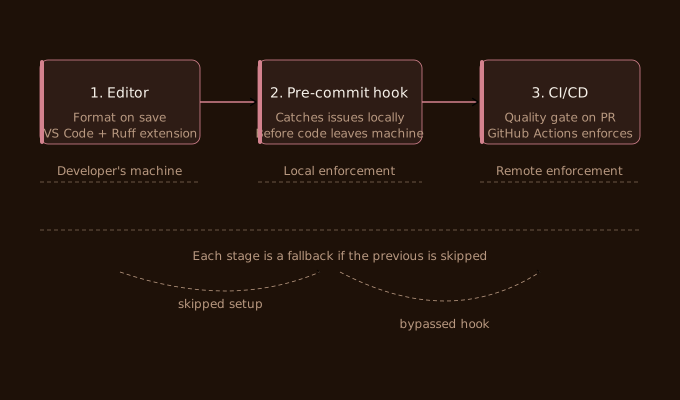
In the IDE (or text editor), I use VS Code with the relevant extensions installed and Format on Save enabled. It does what it sounds like: when the file saves, the formatter runs. Sometimes this needs dev dependencies installed to work properly; check the official docs and you’ll figure it out quickly, I’ll go into Ruff for Python specifically later in this post.
Locally, before committing, is where things get interesting. At various companies I’ve seen the same pattern repeat: developer forgets to format, pushes code, CI fails, they fix locally, force-push, CI reruns. This adds ten minutes to the dev cycle, minimum. Multiply that across a team and it adds up quickly.
Git’s pre-commit hooks solve this cleanly. When you attempt a commit, a hook runs your formatting and linting checks first. If they fail, the commit doesn’t go through. This means no broken CI and no annoying formatting fix commits. This enables the code to validate itself before it ever leaves your machine.
The one catch: developers can skip the setup step entirely, which is exactly why the third layer exists.
In CI/CD, the pipeline enforces what the pre-commit hook encourages. Even if someone bypasses local hooks, nothing merges unless the linting passes. This is your actual quality gate and is what you rely on.
Why Ruff instead of Black and Flake8
Three or more years ago, I used Black for formatting and Flake8 for static analysis. Two tools, two configs, two things to install and maintain. It was a minor friction, but that friction compounded and was a little naff.
Ruff replaces both with a single tool. It’s faster, simpler, and opinionated enough that you don’t have to make many decisions. For a project where the point is less thinking about styling and formatting, that’s exactly what I wanted.
The Setup (Python / FastAPI)
Three things to configure, in roughly this order:
Step 1: VS Code + Ruff extension
Install the Ruff extension from the VS Code marketplace — the official one is published by Astral (charliermarsh.ruff). Once installed, add this to your .vscode/settings.json:
{
  "[python]": {
    "editor.formatOnSave": true,
    "editor.defaultFormatter": "charliermarsh.ruff",
    "editor.codeActionsOnSave": {
      "source.fixAll.ruff": "explicit",
      "source.organizeImports.ruff": "explicit"
    }
  }
}
Committing .vscode/settings.json to the repo is intentional. Anyone who clones the project and opens it in VS Code gets the same formatting behaviour automatically. No extra knowledge required.
No separate Ruff installation is needed as the VS Code extension ships its own binary, and the pre-commit hook (added in Step 2) bundles its own too. You just need to add your Ruff config to ruff.toml:
[tool.ruff]
line-length = 88
target-version = "py312"

[tool.ruff.lint]
select = ["E", "F", "I"]
The select block opts into pycodestyle errors (E), Pyflakes (F), and isort import sorting (I). This covers what you’d previously have needed Black, Flake8, and isort to do separately.
Step 2: Pre-commit hooks
First, install the pre-commit package:
pip install pre-commit
Then create a .pre-commit-config.yaml in the root of your repo. Here’s exactly what’s in the project:
repos:
  - repo: https://github.com/astral-sh/ruff-pre-commit
    rev: v0.11.4
    hooks:
      - id: ruff
        args: [--fix]
        files: ^api/
      - id: ruff-format
        files: ^api/
A few things worth noting here. The files: ^api/ pattern scopes the hooks to the API directory only — the frontend has its own linting story (ESLint + Prettier), so there’s no point running Ruff across the whole repo. The ruff hook handles lint checks and the --fix flag means it’ll auto-fix what it can rather than just reporting issues. The ruff-format hook handles formatting, equivalent to what Black would have done.
Once the file is in place, install the hooks:
pre-commit install
This wires the hooks into your local .git/hooks/pre-commit. From this point, every time you run git commit, Ruff runs first. If it finds issues it can’t auto-fix, the commit is blocked and the problems are printed to the terminal. Fix them, stage the changes, and commit again.
You can also run it manually across all files at any point:
pre-commit run --all-files
Useful for a first run after setting up, or after pulling in changes from someone else who hasn’t had the hooks installed.
That’s it. Once it’s done, your automatic project linting works in the background. Which is perfect.